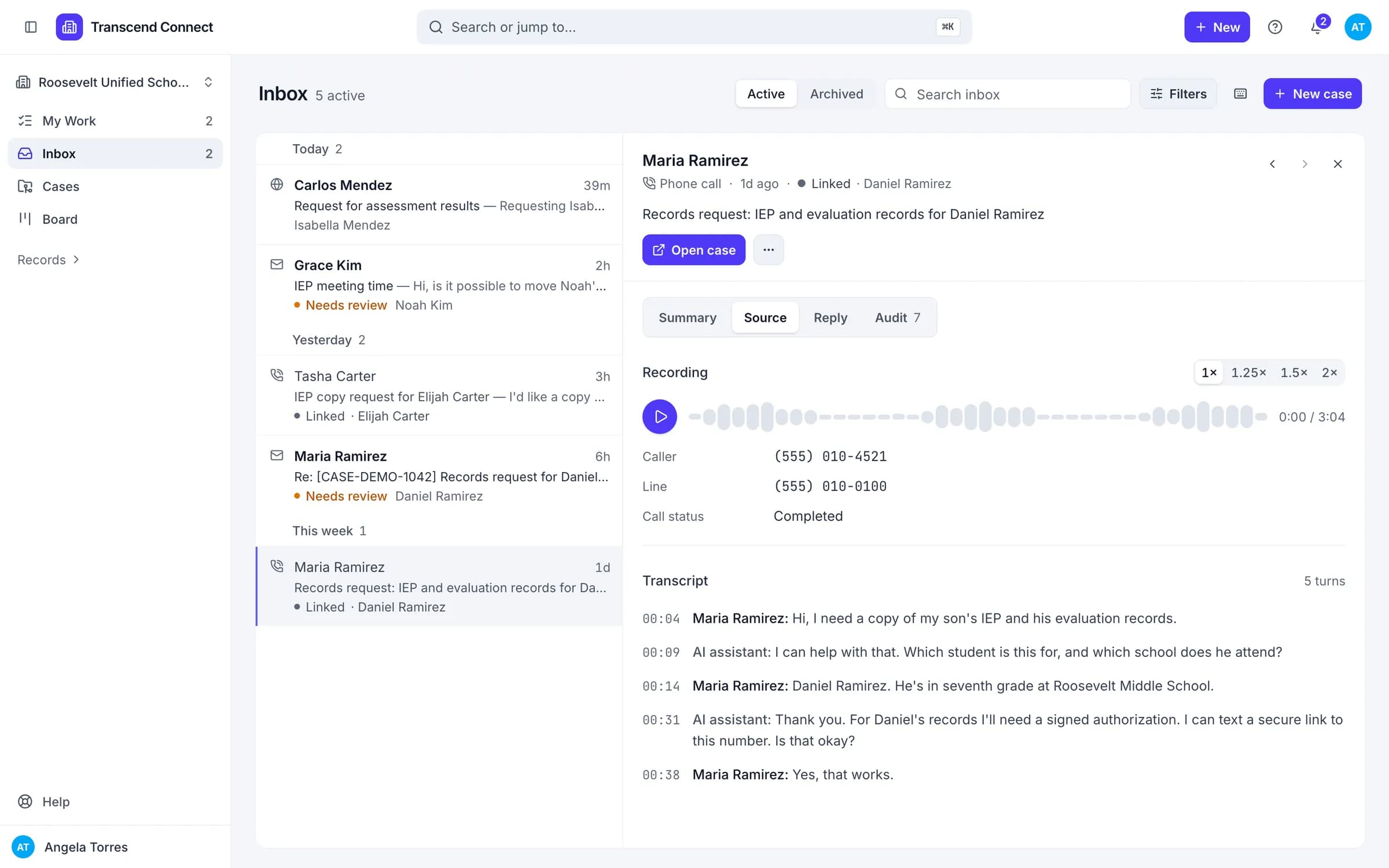
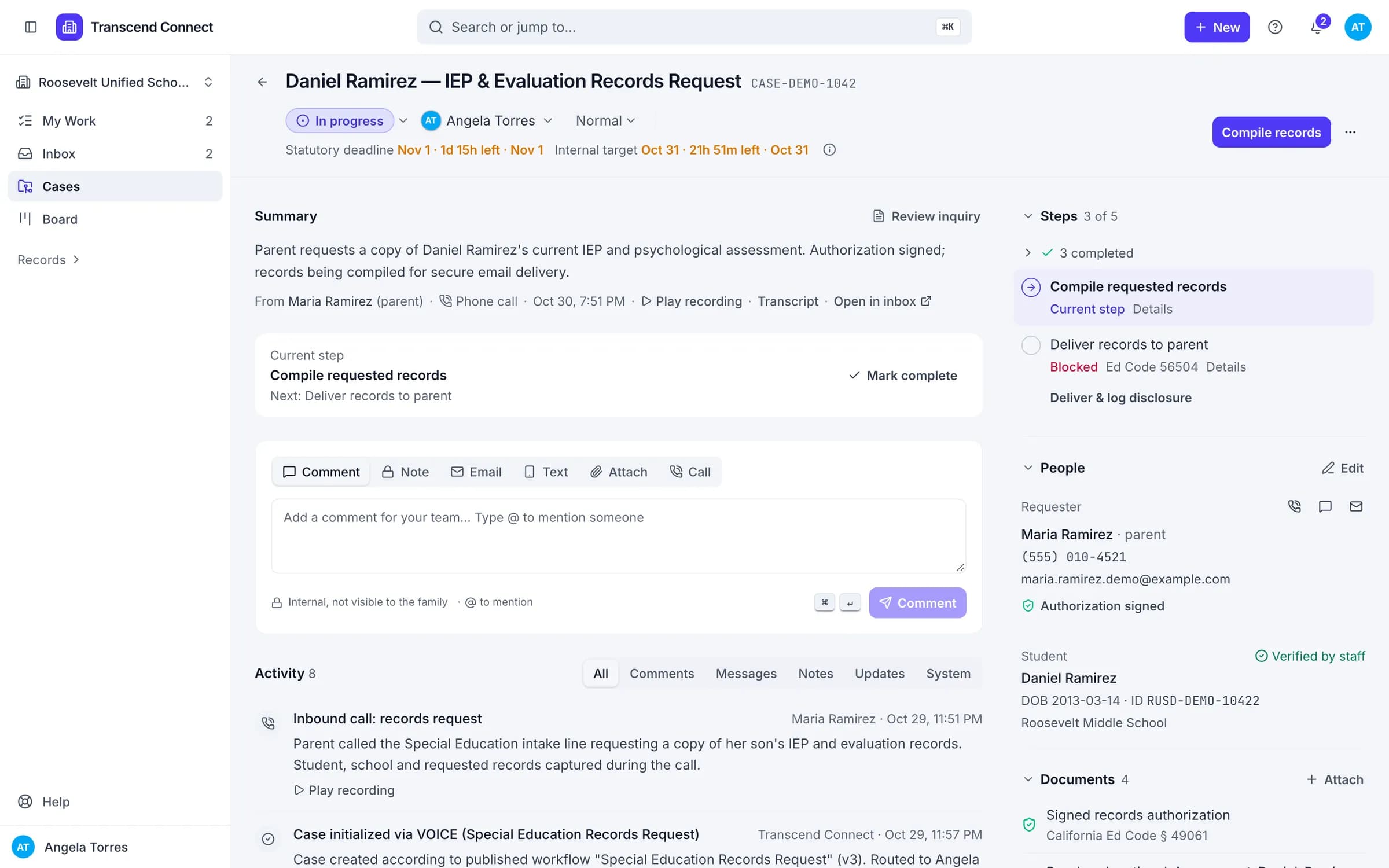
Transcend Connect answers your phones and inboxes 24/7, collects what your staff need and routes each request to the right department as a tracked case, for K-12 districts, colleges and universities, and county offices of education.
Our own receptionist runs on Transcend Connect. What to try
Sample institution · fictional data
24/7AI answering for calls and email
Any languageyour community needs
Business daysdeadlines that skip your closures
1 hoursupport response, guaranteed
The problem
Your staff should work cases, not chase calls and emails.
Records, enrollment and HR offices handle a constant stream of requests from parents, students, former students, attorneys, agencies, employees and community members. That often means:
Repetitive phone calls
Staff answer the same handful of questions dozens of times a day.
Overflowing voicemail
Messages pile up while callers wait days for a call back.
Requests sent to the wrong department
Misrouted questions bounce between the central office and school sites.
Missing documents and incomplete information
Phone tag just to collect an ID, a signature or an authorization.
Manual information entry
Details from voicemails and emails retyped into spreadsheets by hand.
Parents calling again for updates
Without a status anyone can check, every open request means more follow-up calls.
Requests forwarded between staff
Requests get lost in forwarded email chains with no clear owner.
Limited service outside business hours
No help after the office closes or over holidays, so every morning starts with a backlog.
Transcend Connect brings all of it into one organized workflow: every request identified, captured as a tracked case and routed to the right queue before staff ever touch it.
Channel · AI voice intake
A phone line that never goes to voicemail.
A conversational AI assistant answers every call, day or night, in any language your community needs. Callers can ask for a person anytime, and during business hours it transfers them to the right staff member.
Understands why the person is calling and answers common questions
Collects the information each request type requires
Identifies the student and the kind of request
Texts or emails forms and secure upload links
Hands urgent or complex requests to staff
Creates a case automatically, with the full transcript
Call summary · Saturday 10:15 AMCase created
Caller
Rosa Méndez (parent)
Student
Mateo Méndez · Grade 4
Request
School transfer
Language
Spanish
Parent is moving across town and wants to transfer Mateo before the next term. Proof of address is still needed.
Secure upload link sent by textSent
Enrollment & Student ServicesRouted
Illustrative example · fictional names
Channel · Intelligent email intake
One inbox becomes an organized workflow.
Stop reading, forwarding and sorting every message by hand. Email, voicemail, text messages and web forms arrive in one universal inbox, where AI triage reads each one and turns it into a case.
Identifies the request type and the right department
Pulls out the student’s name, date of birth and school
Attaches documents to the case
Sends the requester a confirmation automatically
Records inbox · New messageAI triage
From: Okafor & Lane LLP
Records request for a former student
Please send the attendance and discipline records for Priya Shah, born 03/14/1998. A signed authorization is attached.
Attachment: authorization.pdf
Case #4188 · Third-party records requestDue in 10 business days
Student: Priya Shah
DOB: 03/14/1998
Authorization attached
Requester: law office
Student Records · Legal reviewRouted · Confirmation sent
Illustrative example · fictional names
Automated case creation
Your staff start with a case, not a voicemail.
Every call and email becomes a structured case with what staff actually need, routed to the right queue with a business-day due date before anyone touches it.
Student and requester details, contact information and request type
Supporting documents, call transcripts and email history
Assignment, status and internal notes
A full audit history on every case
Try it yourself
Don't take our word for it. Call our office.
Our receptionist is Transcend Connect. It answers right away, day or night, and transfers you to a person Monday–Friday, 8 a.m.–5 p.m. Pacific.
ReceptionistWelcome to Data Decisions. I’m our AI receptionist, and I run on Transcend Connect. Ask me anything, or I can book a walkthrough for you.
Caller¿También habla español?
ReceptionistSí, claro. ¿En qué le puedo ayudar?
CallerCan I talk to someone on your team?
ReceptionistOf course. I’ll transfer you now.
Transferred to the DDI teamBusiness hours
Illustrative example · not a real call
Estimate your time savings
What does intake cost your staff today?
Enter your daily call and email volume, handling time and staff cost to estimate the hours spent on intake each year, and what 25%, 40% or 60% automation could give back.
Your numbers
Start from a typical office size, then adjust each slider.
Range: 10 to 500
Range: 10 to 500
Range: 3 (quick question) to 20 (complex)
Range: $20 to $75
Range: 180 to 260
How it's calculated: 150 contacts a day × 8 minutes × 220 workdays ÷ 60 = 4,400 staff hours a year. One full-time staff member is counted as 1,760 hours.
Today, without automation
What intake costs your staff now
Contacts per day
150
Contacts per year
33,000
Staff hours per year
4,400
Staff cost per year
$154,000
About 2.5 full-time staff
Time spent answering repeat questions, checking voicemail, retyping messages and chasing missing information, before the real work on a request begins.
Estimated: intake takes about 4,400 staff hours ($154,000) a year. At 40% automation, that frees about 1,760 hours, worth about $61,600 a year.
These are estimates based on your inputs, not guaranteed savings. Actual results depend on your mix of requests, your workflows and your staffing.
Five steps turn every incoming call, email or form into clear, trackable progress.
1
Receive
A parent, student, agency or employee reaches you by phone, email, web form or text.
2
Understand
Transcend Connect works out what the person needs and picks the right workflow.
3
Collect
It gathers the required details and asks for missing forms, ID, authorizations or documents.
4
Route
Your routing rules assign the case by department, school, request type or location.
5
Resolve
Staff work the case from one dashboard, with the information and history already organized.
Where it helps
Built for every office that takes requests.
Start with the department that gets the most calls, then add others on the same platform.
Student records
Transcripts, cumulative records, enrollment verifications, immunization records and other student records requests.
Special education
Records requests, reimbursement questions, parent questions and document submissions, each routed to the right team.
Enrollment & student services
Registration questions, required documents, school placement, transfers and enrollment workflows.
Human resources
Employment verifications, applicant questions, onboarding questions and employee service requests.
Transportation
Answers to common transportation questions, with service issues routed to the right team.
Adult education
Registration questions, records requests, program questions and student support.
Administrative departments
Custom workflows for risk management, facilities, real estate, procurement and other operations.
Configuration
Built around how you work, not the other way around.
You control how requests move through your organization.
Routing rules engine
Decide where every request goes and who owns it, without retraining callers or rewriting email rules.
Departments
Schools & locations
Request types
Staff roles
Escalations
Business hours
Versioned workflow templates
Set the questions, required information and documents for each request type. Change a process without losing how earlier cases were handled.
Intake questions
Required information
Document requirements
Automated messages
Business-day deadlines
Due dates count business days and skip the holidays and closures on your calendar, so deadlines stay accurate.
Closures calendar
Due dates
Overdue alerts
Audit trail & reports
Every action on every case is recorded. See what your community is asking for and where the work is piling up.
Call & email volume
Request categories
Response times
Department workloads
Peak periods
Getting started
Start with one department.
You don't need to change everything at once. See how Transcend Connect handles your real requests, staff and processes, then expand to more departments when you're ready.
ScopeOne department
VoiceOne phone number
EmailOne inbox
ProcessOne workflow
FAQ
Questions buyers ask
Does a person ever answer?
Yes. The AI assistant answers every call, 24/7, and callers can ask for a person at any time. During your business hours it transfers them to the right staff member. After hours, it collects the details and opens a case so your staff can follow up.
Which languages does it speak?
Any language your community needs; we add languages on request. Tell us which languages your families use and we will set them up before you go live.
How long does setup take?
It depends on how many departments, phone numbers and inboxes you start with. We recommend starting with one department: we set up the phone number, inbox, request types and routing rules with your team, test them on real requests, then expand when you are ready.
How are routing rules configured?
Rules route each case by department, school, request type, location and business hours, and assign it to a team or a person. Your administrators can manage them, or our team can set them up for you. Workflow templates are versioned, so you can change a process without losing how earlier cases were handled.
Where is our data stored, and who owns it?
Your institution owns its data. Use Transcend’s secure U.S. cloud, encrypted at rest and in transit with role-based access and audit logs, or run it in your own cloud account or on your own servers while Transcend runs intake and routing. Every case keeps a full audit trail, and our support team responds within one hour, guaranteed.
Hosting & architecture
Your records. Your architecture.
Your institution owns its records and decides what to release. Run Transcend in the setup your district prefers, and change it as your needs grow.
Hosted by Transcend
Our secure U.S. cloud
Encrypted at rest and in transit, backed up, with role-based access and audit logs. Nothing for IT to run.
Your cloud
Your own cloud account
Run Transcend in your institution’s Microsoft Azure, AWS or Google Cloud environment, under your own security policies.
On premises
Your own servers
Keep records in your data center and existing systems. Transcend connects to where your records already live.
Centralized or distributed
Organize records the way your district works.
Centralized
One records hub for the whole district, county office or consortium, with every school’s records in one place.
By school or department
Each school or office keeps its own records, with one request portal and one staff view across all of them.
Hear how Connect would answer your phones.
In a free 15-minute walkthrough, we’ll show how Transcend Connect would handle calls and emails for one of your departments: intake, routing, deadlines and reports. No obligation.